
Core Model Algorithms in Detail
The core capabilities of StarWay Data Insight are built on five classic multivariate statistical models: PCA (Principal Component Analysis), PLS (Partial Least Squares Regression), PLS-DA (Partial Least Squares Discriminant Analysis), OPLS (Orthogonal Partial Least Squares Regression), and OPLS-DA (Orthogonal Partial Least Squares Discriminant Analysis).
This chapter takes a deep look at the principles, applicable scenarios, mathematical essence, and concrete application in the platform of these five algorithms. Understanding these models will help you interpret analysis results better and make more precise data decisions.
📊 Model Family Overview
Before going into the details, let's first see the relationship among the five with one diagram:
┌──────────────────────────────────────────────────────────────────────────────────┐
│                     Multivariate Data Analysis Model Family                      │
├──────────────────────────────────────────────────────────────────────────────────┤
│                                                                                  │
│   ┌──────────────┐            ┌──────────────────────────────────┐               │
│   │ Unsupervised │            │            Supervised            │               │
│   └──────┬───────┘            └────────────────┬─────────────────┘               │
│          │                                     │                                 │
│          ▼                                     ▼                                 │
│   ┌──────────────┐            ┌──────────────────────────────────┐               │
│   │     PCA      │            │      Is Y a continuous value?    │               │
│   │ Explore the  │            └────────────────┬─────────────────┘               │
│   │ structure &  │                             │                                 │
│   │ find patterns│                  ┌──────────┴──────────┐                      │
│   └──────────────┘                  ▼                     ▼                      │
│                                    Yes                   No                      │
│                               (regression)        (classification)               │
│                                     │                     │                      │
│                                     ▼                     ▼                      │
│                            ┌──────────────────┐  ┌──────────────────┐            │
│                            │       PLS        │  │      PLS-DA      │            │
│                            └────────┬─────────┘  └────────┬─────────┘            │
│                                     │                     │                      │
│                                     ▼                     ▼                      │
│                            ┌──────────────────┐  ┌──────────────────┐            │
│                            │       OPLS       │  │     OPLS-DA      │            │
│                            │ Strips orthogonal│  │ Strips orthogonal│            │
│                            │      noise       │  │      noise       │            │
│                            └──────────────────┘  └──────────────────┘            │
│                                                                                  │
└──────────────────────────────────────────────────────────────────────────────────┘
One-sentence summary:
- PCA: "What does the data look like?" → Explore the intrinsic structure
- PLS: "How does X affect Y?" → Establish a predictive relationship
- PLS-DA: "Which class does it belong to?" → Perform classification and discrimination
- OPLS: "How does X affect Y, and how do we separate the noise out?" → Regression that is easier to interpret
- OPLS-DA: "Which class does it belong to, and how do we separate out the within-group noise?" → Classification that is easier to interpret
💡 The relationship between PLS and OPLS: OPLS is not a "more accurate" model; it splits the variation of X into a part "related to Y" and a part "unrelated to Y", making the results easier to explain. In predictive ability the two are usually close, and the main reason to choose OPLS is readability and the clean score plot brought by a single predictive component.
🔬 PCA (Principal Component Analysis)
What is PCA?
PCA (Principal Component Analysis) is an unsupervised dimensionality reduction technique. Its core idea is: use fewer new variables (principal components) to retain as much of the information in the original data as possible.
Imagine you have a set of three-dimensional data points. PCA finds the best two-dimensional plane such that, after the points are projected onto it, they are "spread out" the most — this way the information loss is minimal.
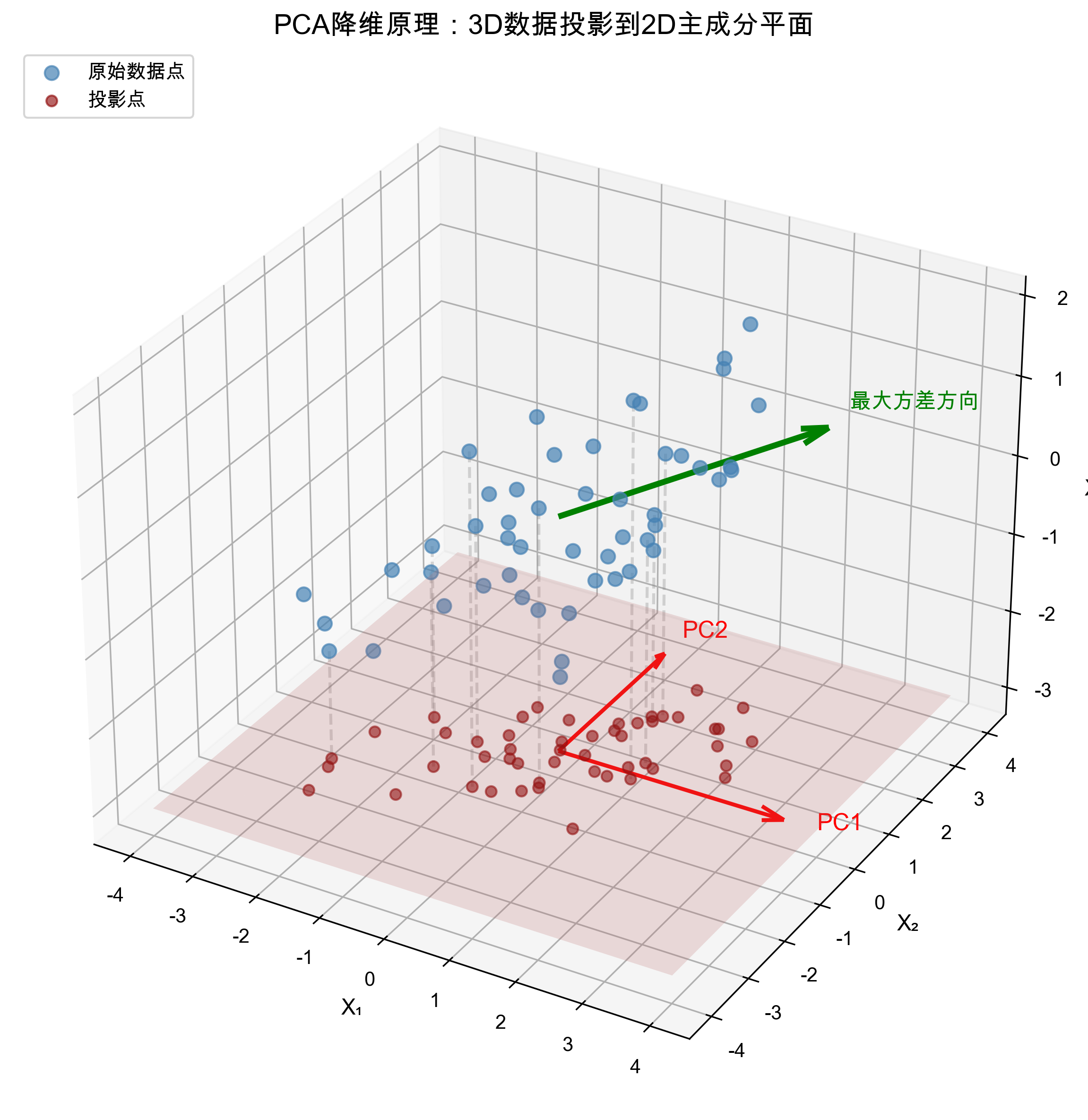
Reading the figure above:
- The blue points represent the original high-dimensional (3D) data
- The red plane is the best projection plane found by PCA (spanned by PC1 and PC2)
- The green dashed lines show the process of projecting the data points onto the plane
- The red crosses after projection retain the information of the direction of maximum variance in the data
Core principles
1. Variance is information
PCA holds that: the direction in which the data varies the most contains the most information.
- If a variable is about the same across all samples (small variance), it carries little information
- If a variable differs greatly (large variance), it carries important information
2. Construction of the principal components
Through a linear transformation, PCA converts the original correlated variables into mutually uncorrelated new variables (principal components):
Where:
- are called principal components
- is the loading, representing the contribution of the original variable to the new component
- The principal components are mutually uncorrelated (orthogonal)
3. Properties of the principal components
- The first principal component (PC1): explains the direction of maximum variance in the data
- The second principal component (PC2): explains the direction of maximum remaining variance, subject to being orthogonal to PC1
- And so on...
Mathematical essence (simplified)
The mathematical essence of PCA is eigenvalue decomposition of the covariance matrix:
- Center the data: subtract the mean of each variable
- Compute the covariance matrix:
- Eigenvalue decomposition:
- (eigenvalue): represents the amount of variance explained by that principal component
- (eigenvector): represents the direction of the principal component (that is, the loadings)
- Select principal components: sort the eigenvalues from largest to smallest and take the first
Application in the platform
Applicable scenarios
- Data exploration: get a preliminary understanding of the overall structure and distribution of the data
- Anomaly detection: find abnormal samples through the T² and SPE statistics
- Dimensionality reduction visualization: project high-dimensional data into 2D/3D space for observation
- Denoising: remove noisy components and keep the main signal
PCA score plot example
The figure below shows a typical score plot from PCA analysis. Each point represents one sample, so the distribution pattern of the samples and any abnormal points can be seen directly:
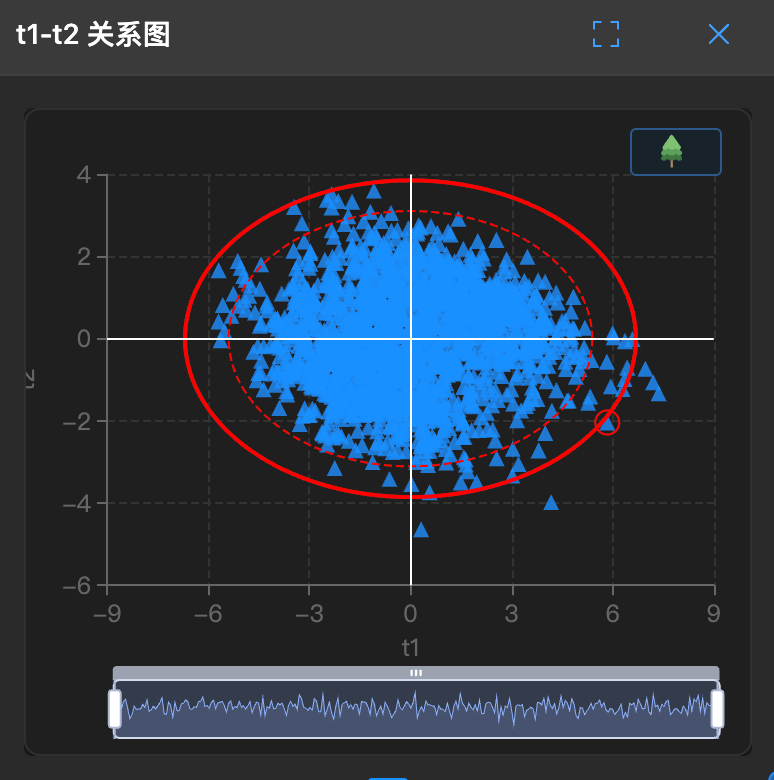
How to interpret it:
- Each gray point represents one sample, positioned by its scores on PC1 and PC2
- The elliptical region represents the confidence interval (usually 95%); points outside it may be abnormal samples
- Points clustered together represent similar samples, while scattered points indicate greater differences
Automatic trigger conditions in the platform
When you have configured only X variables (no Y variable), the platform automatically uses the PCA model:
X columns only → PCA is selected automatically → explore the data structureKey output metrics
| Metric | Meaning | Interpretation |
|---|---|---|
| R²X | Cumulative explained rate of X | How much information in X the model explains; the closer to 1 the better |
| Cumulative contribution rate | The explained proportion of the first k principal components | Usually 80%~95% is enough |
| Loading | The relationship between variables and principal components | See which variables dominate that component |
| Score | The coordinates of samples in the new coordinate system | Used to draw scatter plots and observe the sample distribution |
Choosing the number of principal components
The platform automatically selects the optimal number of principal components through cross-validation, but you can adjust it manually with C+1/C-1:
- Too few: underfitting, with serious information loss
- Too many: overfitting, introducing noise
- Rule of thumb: consider stopping when the contribution of an additional component to R²X is < 5%
Pros and cons of PCA
✅ Advantages:
- Unsupervised, no labeled data needed
- Computationally efficient, with interpretable results
- Effective dimensionality reduction, removing correlation between variables
- Good visualization results
⚠️ Limitations:
- Only looks at the variance structure of X and does not consider Y
- Sensitive to outliers
- Principal components are linear combinations, and may lack business meaning
- Assumes the principal components are orthogonal, which real data may not satisfy
🔗 PLS (Partial Least Squares Regression)
What is PLS?
PLS (Partial Least Squares Regression) is a supervised regression method. Unlike PCA, PLS considers both X (features) and Y (target) when modeling, looking for a latent variable space that best explains the relationship between the two.
Simply put: PCA asks "how does X vary", while PLS asks "how does X affect Y".
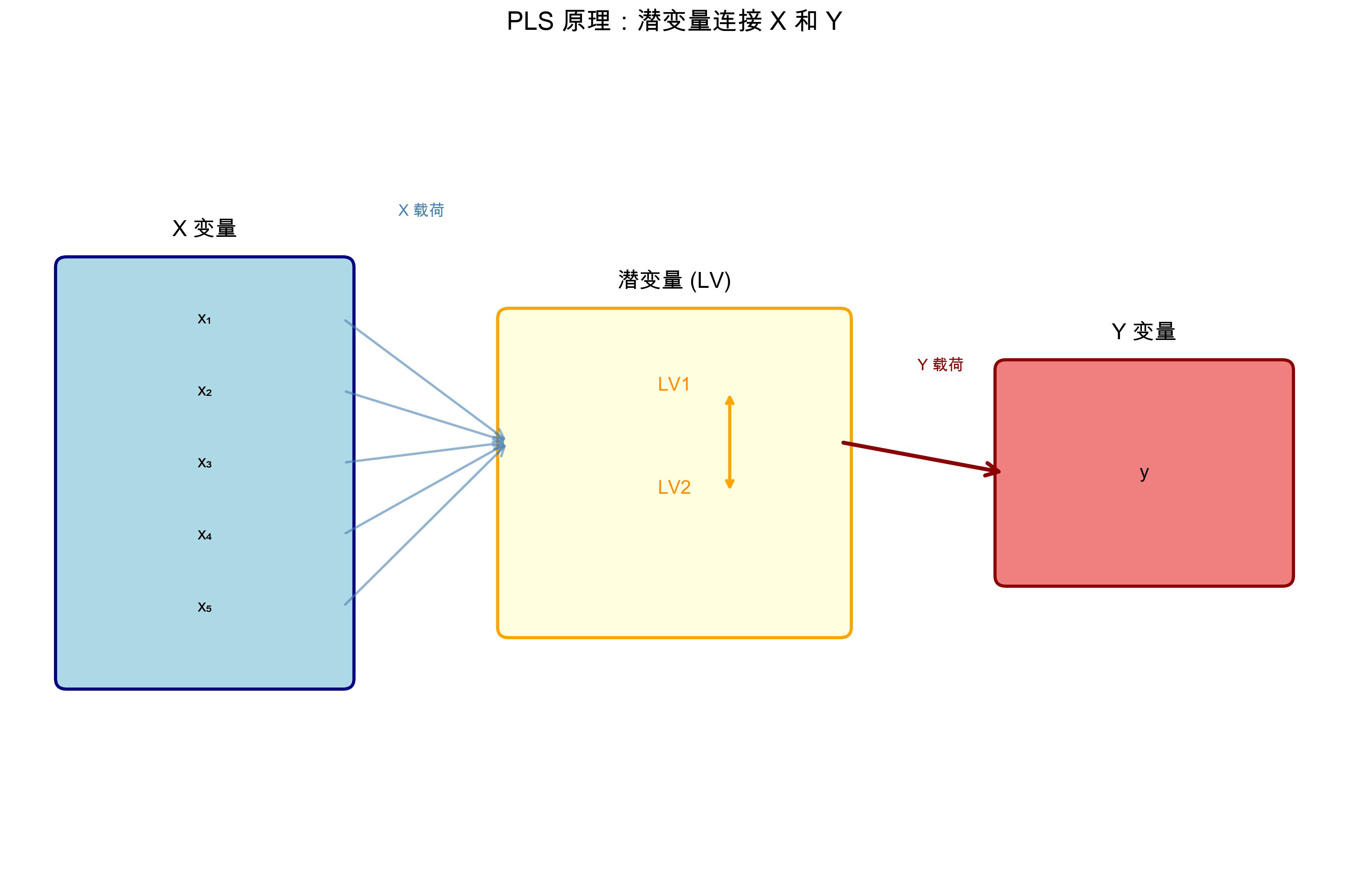
Reading the figure above:
- The blue box on the left is the X variables (X1-X5), and the green box on the right is the Y variable (target)
- The yellow box in the middle is the extracted latent variables (LV1, LV2), which explain both X and Y
- The goal of PLS is to maximize the covariance between the X latent variables and the Y latent variables
- A predictive relationship X → Y is established through the latent variables
Core principles
1. Decompose X and Y simultaneously
PLS decomposes X and Y at the same time, but requires their latent variables to be maximally correlated:
Where:
- : the score matrix of X (similar to the scores of PCA)
- : the loading matrix of X
- : the score matrix of Y
- : the loading matrix of Y
- : the residual matrices
2. Maximize the covariance
The core optimization objective of PLS is: find the latent variables of X and Y such that their covariance is maximized.
This means the components extracted by PLS must both represent the variation of X and be closely related to Y.
3. Extract components iteratively
PLS extracts latent variables one by one through an iterative algorithm (such as NIPALS):
- Find the direction of maximum covariance between X and Y as the first pair of latent variables
- Subtract the already explained part from X and Y (deflation)
- Repeat until enough components have been extracted
Mathematical essence (simplified)
The mathematical core of PLS is covariance maximization:
- Initialization: start from some column of Y or a random vector
- Iterative optimization:
- (find the weights of X from the scores of Y)
- (compute the scores of X)
- (find the weights of Y from the scores of X)
- (compute the scores of Y)
- After convergence: compute the loadings
- Deflation: ,
Application in the platform
Applicable scenarios
- Regression prediction: build a predictive model X → Y
- Variable screening: use VIP to find the X variables with the greatest influence on Y
- Multi-response problems: Y can be several columns (multiple response variables)
- Collinearity handling: remains stable when X variables are highly correlated
Automatic trigger conditions in the platform
When you have configured both X variables and a Y variable, and Y is a continuous value:
X + Y (continuous values) → PLS is selected automatically → build a regression model💡 You can also manually specify the model type in the data configuration, switching freely among PCA / PLS / PLS-DA / OPLS / OPLS-DA.
Key output metrics
| Metric | Meaning | Interpretation |
|---|---|---|
| R²X | Cumulative explained rate of X | The proportion of X variance captured by the model |
| R²Y | Cumulative explained rate of Y | The proportion of Y variation explained by the model; the higher the better |
| Q²Y | Cross-validated predictive ability for Y | The most critical one! Reflects generalization ability; > 0.5 is acceptable, > 0.9 is excellent |
| RMSE | Root mean square error | The average deviation between predicted and true values; the smaller the better |
| VIP | Variable importance in projection | > 1 indicates an important variable, < 0.5 can be ignored |
Choosing the number of latent variables
The platform automatically selects the optimal number of latent variables through cross-validation, on the following principles:
- The number of components is optimal when Q²Y reaches its peak
- If R²Y is very high but Q²Y is low → overfitting, and the number of components should be reduced
- If both are low → underfitting, and you may need more components or a check of the data
VIP analysis
VIP (Variable Importance in Projection) is an important output of PLS; it tells you which X variables matter most for predicting Y.
The figure below shows a typical VIP analysis result: the taller the bar, the greater the influence of that variable on Y:
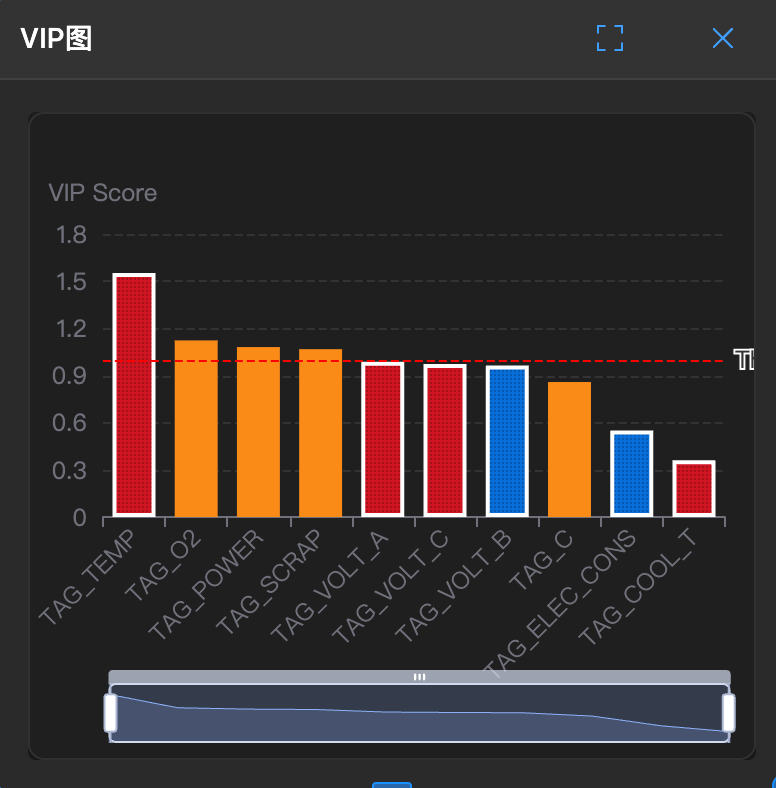
How to interpret it:
- The red reference line (VIP = 1) is the threshold for an important variable
- Variables above the red line (such as x3 and x5 in the example) contribute significantly to Y
- Variables below the red line can be considered for removal to simplify the model
The VIP formula:
Interpretation criteria:
- VIP > 1: an important variable with a significant contribution to Y
- 0.5 < VIP < 1: moderately important
- VIP < 0.5: negligible, consider removing it
Pros and cons of PLS
✅ Advantages:
- Handles X and Y at the same time, with strong predictive power
- Effectively solves the multicollinearity problem
- Supports multiple response variables (multi-response)
- Provides VIP for variable screening
- Still works when the number of samples is smaller than the number of variables
⚠️ Limitations:
- Requires labeled data (Y)
- Model interpretation is more complex than PCA
- Limited ability to model nonlinear relationships
- Sensitive to outliers
🎯 PLS-DA (Partial Least Squares Discriminant Analysis)
What is PLS-DA?
PLS-DA (Partial Least Squares Discriminant Analysis) is an extension of PLS, dedicated to classification problems. When Y is a class label (such as "qualified/unqualified" or "Class A/Class B/Class C"), PLS-DA is your choice.
Simply put: PLS predicts values, PLS-DA predicts classes.
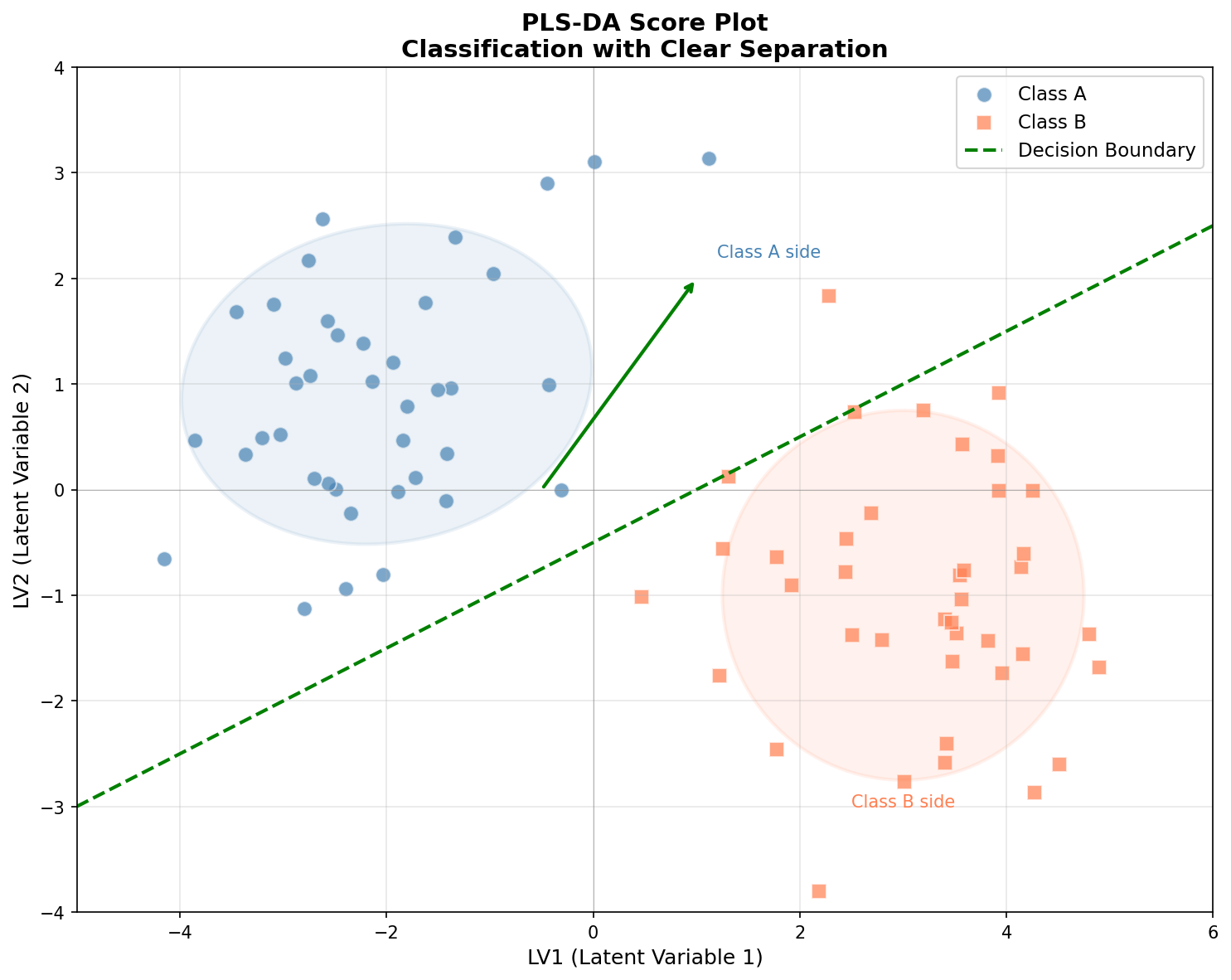
Reading the figure above:
- The blue circles represent Class A and the orange squares represent Class B
- The samples of the two classes form clearly separated clusters in the latent variable space (LV1-LV2)
- The green dashed line is the decision boundary used to separate the two classes
- The shaded ellipses represent the confidence regions of each class; the less they overlap, the better the classification
Core principles
1. Turn the classification problem into a regression problem
The clever trick of PLS-DA is: convert the class labels into dummy variables, then use PLS for regression.
For example, a three-class problem (A, B, C) is converted into:
| Sample | Original label | Y1(A) | Y2(B) | Y3(C) |
|---|---|---|---|---|
| 1 | A | 1 | 0 | 0 |
| 2 | B | 0 | 1 | 0 |
| 3 | C | 0 | 0 | 1 |
Then standard PLS is applied to this multi-response Y matrix.
2. Discriminant rule
At prediction time, PLS-DA outputs a "score" for each class, and the sample is assigned to the class with the highest score:
3. Visualization advantages
The score plot of PLS-DA is naturally suited to showing classification performance:
- Samples of different classes should form separated clusters in the plot
- The first latent variable is usually most related to the between-group difference
- The second latent variable shows the within-group variation
Mathematical essence
The mathematics of PLS-DA is almost the same as PLS; the difference lies in how the Y matrix is constructed:
- Encoding: convert the class labels into an indicator matrix
- PLS regression: run standard PLS on X and the encoded Y
- Discrimination: at prediction time, choose the class with the largest response value
Class encoding methods:
- Binary classification: Y = 0/1 or -1/+1
- Multiclass classification: one-hot encoding (one column per class)
Application in the platform
Applicable scenarios
- Binary classification: qualified/unqualified, positive/negative, normal/abnormal
- Multiclass classification: raw material grading, product typing, variety identification
- Feature selection: find the key variables that distinguish different classes
- Biomarker discovery: medical and omics data analysis
Automatic trigger conditions in the platform
When you have configured X variables and a Y variable, and Y is a class label (text or discrete values):
X + Y (class labels) → PLS-DA is selected automatically → build a classification modelKey output metrics
| Metric | Meaning | Interpretation |
|---|---|---|
| R²X | Cumulative explained rate of X | The X variance captured by the model |
| Accuracy | Classification accuracy | The proportion of correct predictions; watch out for the trap of class imbalance |
| F1 Score | Harmonic mean of precision and recall | More reliable than Accuracy when classes are imbalanced |
| AUC | Area under the ROC curve | Discrimination ability: 0.5 is random, 1.0 is perfect, > 0.8 is good |
| Confusion matrix | Predicted vs. actual classification table | See at a glance which class is easily confused |
| VIP | Variable importance | Find the key variables that distinguish the classes |
Classification performance evaluation
Reading the confusion matrix:
The figure below shows the confusion matrix of a PLS-DA model, directly displaying the model's prediction performance on each class:
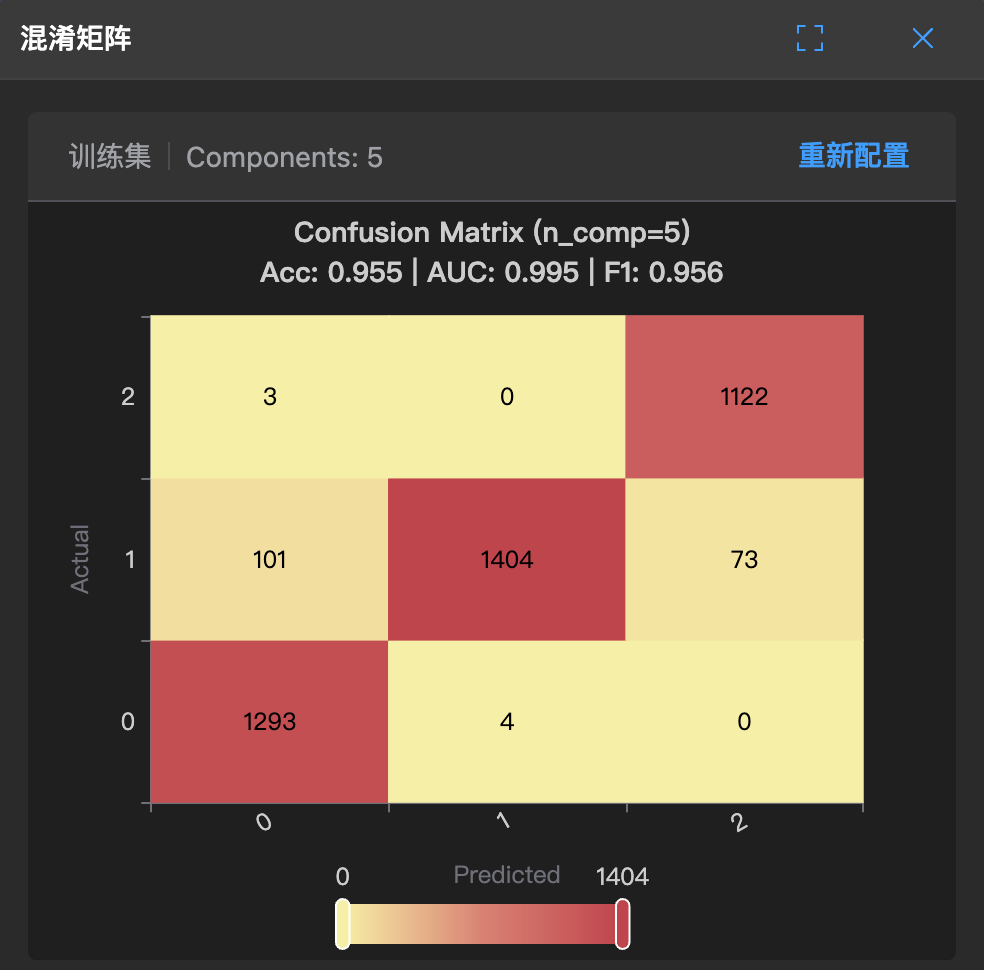
How to interpret it:
- The values on the diagonal (dark color) are the number of correctly classified samples
- The off-diagonal values are the number of misclassified samples
- Ideally, all samples should be concentrated on the diagonal
The confusion matrix in table form:
                  Predicted
           Positive      Negative
        ┌─────────────┬─────────────┐
  True  │     TP      │     FN      │
Positive│ (True Pos.) │ (False Neg.)│
        ├─────────────┼─────────────┤
  True  │     FP      │     TN      │
Negative│ (False Pos.)│ (True Neg.) │
        └─────────────┴─────────────┘
Derived metrics:
- Precision: — of the ones predicted positive, how many are real
- Recall: — of the truly positive ones, how many were found
- F1 Score: — a combined metric
The trap of class imbalance:
If 95% of the samples are Class A and 5% are Class B:
- Even if the model predicts Class A for everything, Accuracy is still 95%
- But this is completely useless for Class B!
- Solution: look at the F1 Score and AUC, or adjust the class weights
ROC and AUC
ROC curve: true positive rate vs. false positive rate at different thresholds
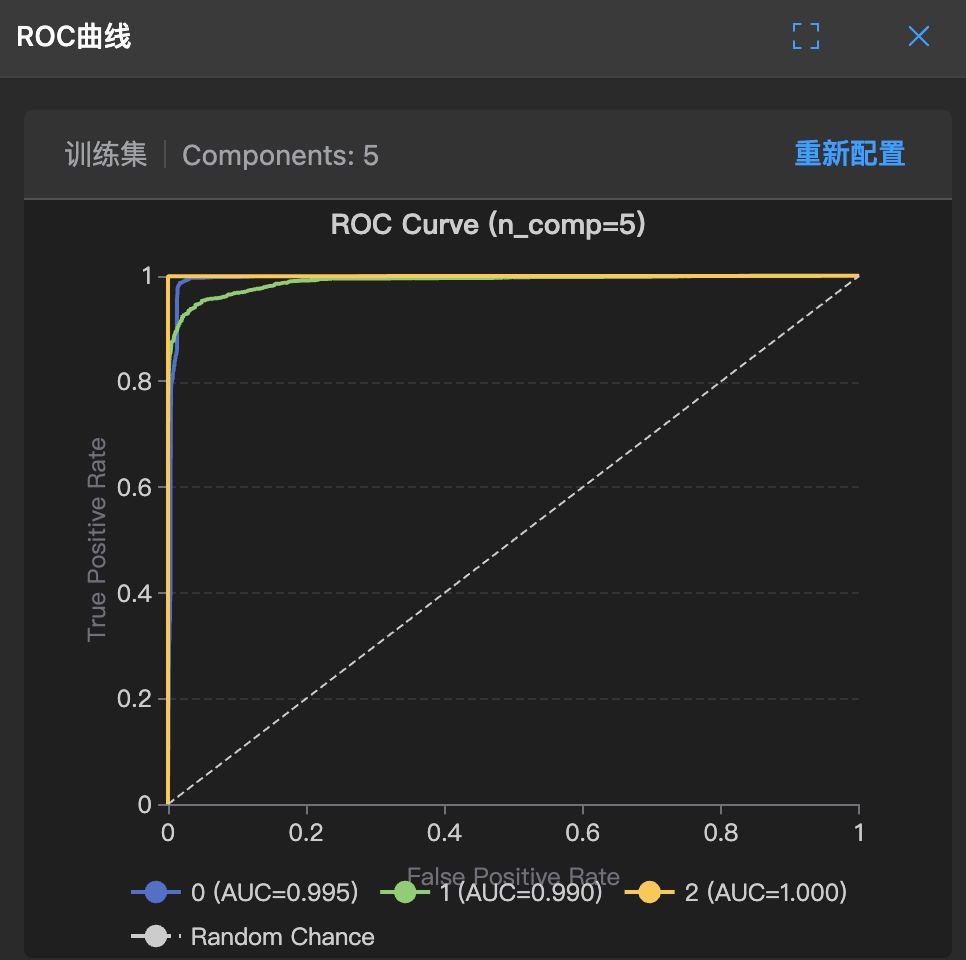
How to interpret it:
- The closer the curve is to the top-left corner, the better the model
- The diagonal = random guessing
AUC evaluation criteria:
- AUC = 0.5: random level (no discrimination ability)
- 0.7 ≤ AUC < 0.8: acceptable
- 0.8 ≤ AUC < 0.9: good
- AUC ≥ 0.9: excellent
Pros and cons of PLS-DA
✅ Advantages:
- Suitable for high-dimensional small-sample data (number of variables > number of samples)
- Handles multicollinearity
- Provides visualization (the score plot shows class separation)
- Gives VIP for screening discriminant variables
- More robust than LDA (linear discriminant analysis)
⚠️ Limitations:
- Assumes the boundary between classes is linear
- Sensitive to class imbalance
- Risk of overfitting (when there are too many components)
- Requires strict evaluation by cross-validation
🧭 OPLS (Orthogonal Partial Least Squares Regression)
What is OPLS?
OPLS (Orthogonal Projections to Latent Structures) was proposed by Trygg and Wold in 2002 and is an interpretation-improved version of PLS. Its core idea is:
Split the variation of X into two blocks — "predictive variation related to Y" and "orthogonal variation unrelated to Y" — and keep only the former for prediction.
In reality, industrial data often contains a lot of systematic fluctuation unrelated to quality: ambient temperature drift, equipment aging, batch-to-batch baseline drift, instrument state changes... These fluctuations make the components of PLS "go off track", and the score plot looks like a tangled mess.
OPLS first strips this noise out of X through orthogonal signal correction (OSC), and then runs PLS on the clean data.
Core principles
1. Split X into two parts
OPLS decomposes the variation of X into two parts:
- (predictive variation): related to Y and carrying the true causal relationship, with only one predictive component
- (orthogonal variation): unrelated to Y; it is systematic noise and is filtered out
2. Filter first, then regress
The implementation path in the platform is:
Original X → OPLS orthogonal correction → denoised Z → run PLS on Z → predict Y- Orthogonal correction: iteratively find the direction orthogonal to Y (), compute the orthogonal scores , and subtract them from X
- Obtain the net signal: after repeating N times, what remains is , containing only predictive information
- Build the regression: run standard PLS on to obtain the predictive model
The orthogonal weights are obtained iteratively from the following expression ( being the PLS weights):
3. ⚠️ What "number of components" means in the platform (important)
This is the point where it is easiest to trip up:
| Model | Meaning of "number of components (C+1 / C-1)" |
|---|---|
| PCA | Number of principal components |
| PLS / PLS-DA | Number of latent variables |
| OPLS / OPLS-DA | Number of "orthogonal components" stripped off |
💡 Why? OPLS always has exactly 1 predictive component (which is also why it can draw a clean, single-direction score plot). When you click C+1 on OPLS, what increases is not "predictive power" but "one more layer of noise stripped off".
Therefore: C+1 on OPLS should not be understood as "the model became more complex", but as "the noise filtering became more thorough".
4. Equivalent coefficients (used for SHAP and the regression coefficient plot)
Because the prediction of OPLS happens in the corrected Z space, restoring it to coefficients on the original variables requires a projection transformation:
Internally, the platform uses exactly these equivalent coefficients to draw the regression coefficient plot and to compute SHAP values, ensuring that the explanation corresponds to the original process variables rather than abstract latent variables.
Application in the platform
Applicable scenarios
- Industrial data with strong noise: obvious baseline drift, environmental drift, batch systematic bias
- Spectroscopic data: near-infrared, Raman, chromatography, and other data with scattering/baseline interference
- Situations requiring clear explanation: when you need to explain to process or management people "which variable is actually at work"
- Marker screening: combined with S-Plot to quickly pinpoint candidate markers
Key output metrics
| Metric | Meaning | Interpretation |
|---|---|---|
| R²X | Cumulative explained rate of X | Includes both the predictive and the orthogonal part |
| R²Y | Cumulative explained rate of Y | The higher the better |
| Q²Y | Cross-validated predictive ability | The core metric of generalization ability; > 0.5 is acceptable |
| VIP | Variable importance | > 1 indicates an important variable |
| S-Plot | Covariance vs. correlation coefficient | Variables in the top-right / bottom-left corners are candidate markers |
Dedicated chart: S-Plot
OPLS has a "killer" chart that PLS does not have — the S-Plot: the horizontal axis is covariance (size of contribution) and the vertical axis is the correlation coefficient (reliability). Variables falling in the top-right corner (positive correlation) or the bottom-left corner (negative correlation) both contribute a lot and are stable, making them ideal marker candidates.
See: S-Plot Marker Plot
Automatic trigger conditions in the platform
OPLS is not triggered automatically; it must be selected manually in the data configuration:
X + Y (continuous values) + manually select OPLS → orthogonally corrected regression modelPros and cons of OPLS
✅ Advantages:
- Strong interpretability: a single predictive component makes the score plot and loading plot clearly one-directional instead of "a tangled mess"
- Strips systematic noise: particularly effective against interference such as baseline drift and environmental drift
- Retains all the advantages of PLS: collinearity, small samples, and multiple responses are all no problem
- Comes with S-Plot: marker screening becomes more intuitive
⚠️ Limitations:
- Predictive ability is usually no better than PLS; the gain lies mainly in interpretability
- The number of orthogonal components must be chosen carefully: stripping too much may throw away useful information along with the noise
- The "business meaning" of orthogonal components is often unclear; do not over-interpret them
- It is still a linear method
🧭 OPLS-DA (Orthogonal Partial Least Squares Discriminant Analysis)
What is OPLS-DA?
OPLS-DA is simply the classification version of OPLS: first encode the class labels as dummy variables, then build the model with OPLS.
It is almost standard practice in fields such as metabolomics, food authenticity identification, and raw material grading, for a very direct reason — in these scenarios, the within-group noise is often larger than the between-group difference. OPLS-DA can suppress the within-group noise and make the question "can the two classes really be separated" obvious at a glance.
Core differences from PLS-DA
| Dimension | PLS-DA | OPLS-DA |
|---|---|---|
| Predictive components | Multiple latent variables | Only 1 predictive component |
| Score plot | Requires picking LV1/LV2 and may be skewed by noise | A single predictive axis, making between-group separation more intuitive |
| Noise handling | Cannot be separated explicitly | Explicitly stripped into orthogonal components |
| S-Plot | Usable | More suitable (the recommended usage) |
| Applicable data | General classification data | Classification data with large within-group variation |
Discriminant rule
The same as PLS-DA: take the class with the largest response value:
Key output metrics
| Metric | Meaning | Interpretation |
|---|---|---|
| R²X | Cumulative explained rate of X | Includes both the predictive and the orthogonal part |
| Accuracy | Classification accuracy | Watch out for the class imbalance trap |
| F1 Score | Harmonic mean of precision and recall | More reliable when classes are imbalanced |
| AUC | Area under the ROC curve | > 0.8 good, ≥ 0.9 excellent |
| Confusion matrix | Predicted vs. actual | See which class is easily confused |
| S-Plot | Covariance vs. correlation | Pinpoint the marker that distinguishes the two classes |
Automatic trigger conditions in the platform
X + Y (class labels) + manually select OPLS-DA → orthogonally corrected classification modelPros and cons of OPLS-DA
✅ Advantages:
- Between-group separation visualization is significantly better than PLS-DA
- Few parameters (only the number of orthogonal components needs tuning)
- Suitable for high-dimensional data with large within-group variation
⚠️ Limitations:
- Higher risk of overfitting: with too many orthogonal components it easily "learns the noise as a pattern", so Q² / AUC must be checked repeatedly
- Still sensitive to class imbalance
- Still a linear boundary
🔄 Comparison and Selection of the Five
Quick selection guide
                        Start
                          │
                          ▼
                 ┌──────────────────┐
                 │  Is there a Y    │
                 │    variable?     │
                 └────────┬─────────┘
                          │
              ┌───────────┴────────────┐
              ▼                        ▼
             No                       Yes
              │                        │
              ▼                        ▼
      ┌────────────────┐    ┌──────────────────────┐
      │      PCA       │    │   What type of Y?    │
      │    Explore     │    └──────────┬───────────┘
      │    structure   │               │
      └────────────────┘               │
                                       │
                     ┌─────────────────┴─────────────────┐
                     ▼                                   ▼
                Continuous                         Class labels
                     │                                   │
                     ▼                                   ▼
         ┌────────────────────────┐          ┌────────────────────────┐
         │   Obvious systematic   │          │   Obvious systematic   │
         │   noise / baseline     │          │   noise / baseline     │
         │   drift?               │          │   drift?               │
         └───────────┬────────────┘          └───────────┬────────────┘
            ┌────────┴────────┐                 ┌────────┴────────┐
            ▼                 ▼                 ▼                 ▼
           No                Yes               No                Yes
            │                 │                 │                 │
            ▼                 ▼                 ▼                 ▼
    ┌───────────────┐ ┌───────────────┐ ┌───────────────┐ ┌───────────────┐
    │      PLS      │ │     OPLS      │ │    PLS-DA     │ │    OPLS-DA    │
    │  Regression   │ │  Explanation  │ │ Classification│ │  Separation   │
    │  prediction   │ │  comes first  │ │ discriminant  │ │  comes first  │
    └───────────────┘ └───────────────┘ └───────────────┘ └───────────────┘
Detailed comparison table
| Feature | PCA | PLS | PLS-DA | OPLS | OPLS-DA |
|---|---|---|---|---|---|
| Learning type | Unsupervised | Supervised | Supervised | Supervised | Supervised |
| Y variable | Not needed | Continuous values | Class labels | Continuous values | Class labels |
| Main purpose | Dimensionality reduction, exploration | Regression prediction | Classification and discrimination | Regression + better interpretability | Classification + better separation |
| Optimization objective | Maximum X variance | Maximum X-Y covariance | Maximum class separation | Keep predictive variation, strip orthogonal | Keep predictive variation, strip orthogonal |
| Number of predictive components | k principal components | k latent variables | k latent variables | Fixed at 1 | Fixed at 1 |
| Meaning of C+1 | Add a principal component | Add a latent variable | Add a latent variable | Add an orthogonal stripping layer | Add an orthogonal stripping layer |
| Key metrics | R²X | R²Y, Q²Y, RMSE | Accuracy, F1, AUC | R²Y, Q²Y, VIP | Accuracy, F1, AUC |
| Signature charts | Score plot, loading plot | Prediction plot, VIP plot | ROC, confusion matrix | S-Plot, equivalent coefficients | S-Plot, confusion matrix |
| Sample requirements | No restriction | More samples than variables is better | Balanced samples per class is better | Same as PLS | Same as PLS-DA |
| Main advantage | No labels needed | Strong predictive power | The standard approach to classification | Results easy to interpret | Clear separation between groups |
Combined usage strategies
In real projects, these models are often used in combination:
Scenario 1: explore first, then model
1. PCA explores the data structure → find anomalies, understand the distribution
2. Clean the data → remove abnormal samples
3. PLS / PLS-DA (or OPLS / OPLS-DA) modeling → build a prediction / classification model
Scenario 2: model diagnosis
1. PLS trains the model
2. Read the score plot with a PCA mindset → check the sample distribution
3. Combine with T²/SPE → identify abnormal samples
Scenario 3: variable screening
1. PLS / OPLS computes VIP
2. Remove variables with VIP < 0.5
3. Check the S-Plot with OPLS → pinpoint markers that both contribute a lot and are stable
4. Rebuild the model → simplify the model and improve generalization
Scenario 4: model upgrade (PLS → OPLS)
1. Build a PLS model and find that the score plot is "a tangled mess" and that Q² is acceptable but hard to explain
2. Switch to OPLS → orthogonal components strip the systematic noise
3. Compare Q²Y: if it is basically unchanged while the plots are clearly cleaner → adopt OPLS
4. Then look at the S-Plot → find candidate markers and go back to business validation
🛠️ Modeling Practice in the Platform
Modeling workflow
Parameter tuning tips
Choosing the number of components / latent variables
The platform provides the C+1/C-1 buttons for manual adjustment:
| Symptom | Cause | Solution |
|---|---|---|
| High R², low Q² | Overfitting | Reduce the number of components |
| Both R² and Q² low | Underfitting | Increase the number of components |
| Q² decreases as components are added | Noise is being introduced | Choose the number of components at the Q² peak |
⚠️ Note for OPLS / OPLS-DA: here the "number of components" is the number of orthogonal components. The criterion is still to look at Q²Y (or AUC) — if adding too many orthogonal components causes Q²Y to drop, then you have started to lose useful information.
Cross-validation settings
- K-Fold: used when the sample size is large (default 7 folds, adjustable in the system settings)
- Leave-one-out (LOO): used when the sample size is small
- Random seed: fix the seed to guarantee reproducible results
Model diagnosis checklist
After training a model, check it against the following lists:
General checks (all models):
- [ ] Whether R²X is reasonable (> 0.5 is usually acceptable)
- [ ] Whether there are obvious outliers in the score plot
- [ ] Whether T²/SPE exceed their limits
Checks specific to PLS / OPLS:
- [ ] Q²Y > 0.5 (the minimum threshold)
- [ ] Gap between R²Y and Q²Y < 0.2 (overfitting prevention)
- [ ] Whether the high-VIP variables make business sense
- [ ] Whether the prediction scatter plot is distributed along the diagonal
Checks specific to PLS-DA / OPLS-DA:
- [ ] Accuracy > 0.8 (depending on the difficulty of the task)
- [ ] A reasonable F1 Score (a must-check when classes are imbalanced)
- [ ] AUC > 0.8
- [ ] Whether some class performs particularly badly in the confusion matrix
- [ ] Whether the classes are clearly separated in the score plot
Extra checks for the OPLS family:
- [ ] After switching to OPLS, Q²Y (or AUC) has not dropped noticeably — otherwise useful information was stripped away
- [ ] Whether the high-contribution variables at both ends of the S-Plot are consistent with business understanding
- [ ] Whether there are too many orthogonal components (usually 1~3 is enough)
📚 Further Reading
If you want to understand these algorithms more deeply, the following resources are recommended:
Classic literature:
- Wold, S. et al. (2001). PLS-regression: a basic tool of chemometrics
- Trygg, J. & Wold, S. (2002). Orthogonal projections to latent structures (O-PLS)
- Bylesjö, M. et al. (2006). OPLS discriminant analysis: combining the strengths of PLS-DA and SIMCA classification
Related charts in the platform:
- Model Summary —— view the overall model metrics
- Score Plot —— sample distribution visualization
- Loading Plot —— variable contribution analysis
- Loading Bar Chart —— view X loadings/weights by component
- Biplot —— scores and loadings compared in one chart
- S-Plot Marker Plot —— OPLS marker screening
- VIP Plot —— variable importance ranking
- Regression Coefficient Plot —— direction and magnitude of the original variables
- SHAP Analysis Plot —— interpretability breakdown of variable contributions
- T² Plot —— in-model anomaly detection
- SPE Plot —— out-of-model anomaly detection
- ROC Curve —— classification model evaluation
💡 Summary
| Model | Understanding it in one sentence | When to use it |
|---|---|---|
| PCA | What does the data look like? | Structure exploration, dimensionality reduction, anomaly detection |
| PLS | How does X predict Y? | Regression problems, building a prediction equation |
| PLS-DA | Which class does it belong to? | Classification problems, discriminant analysis |
| OPLS | How does X predict Y, and where is the noise? | Regression with systematic noise that needs clear explanation |
| OPLS-DA | Which class does it belong to, and what is the within-group noise? | Classification with large within-group variation, marker screening |
Master these five models and you have mastered the core of StarWay Data Insight. Remember: models are tools; business understanding is the soul. Good analysis = the right model + clean data + deep domain knowledge.
May your data exploration journey go smoothly! 🚀