
Step 2: Modeling Analysis
Configuration is done, and now comes the moment to witness the miracle — modeling!
🤖 How the Platform Chooses an Algorithm
The platform automatically recommends an algorithm based on your data configuration, and you can also specify it manually in the data configuration:
| Your configuration | Automatic selection | Description |
|---|---|---|
| Only X columns | PCA | Exploration mode: see what the data looks like and whether there is clustering |
| X and Y, and Y is a continuous value | PLS | Prediction mode: build a regression relationship between X and Y |
| X and Y, and Y is a class label | PLS-DA | Discrimination mode: determine which class a sample belongs to |
All five models available for manual selection:
PCA · PLS · PLS-DA · OPLS · OPLS-DA
💡 When should you consider OPLS / OPLS-DA? When the data has obvious systematic noise (baseline drift, environmental drift, batch systematic bias), or when you want the score plot to be "cleaner" and easier to explain to others. They first strip out the orthogonal variation unrelated to Y, and then build the model.
⚠️ Note: the "number of components" of the OPLS family refers to the number of orthogonal components stripped out, not the number of latent variables (the predictive component is fixed at 1). See Core Model Algorithms Explained for details.
⚡ Click Fit to Start Training
Click the Fit (refit) button, and the platform will automatically find the best number of components through cross-validation.
Progress is shown during training, and when it finishes the model enters the "fitted" state.
💡 The behavior of the automatic search can be adjusted: seven parameters, including the number of cross-validation folds, the maximum number of components, and the early-stopping tolerance, are all configured in Settings → Model Training Settings. See Model Training Settings for details.
🎛️ Tuning Parameters Is Like Adjusting the Volume

Whether a model is good or not depends heavily on its parameters. The most critical parameter is the number of components (Components), also called "latent variables".
- C+1 / C-1 buttons:
- Click C+1 to add one component; the model becomes more complex and fits better, but may overfit.
- Click C-1 to remove one component; the model becomes simpler and generalizes better.
⚠️ The meaning of "number of components" differs between models:
Model What C+1 adds PCA Number of principal components PLS / PLS-DA Number of latent variables OPLS / OPLS-DA Number of orthogonal components (noise layers that are stripped out)
📊 Reading the Health Report
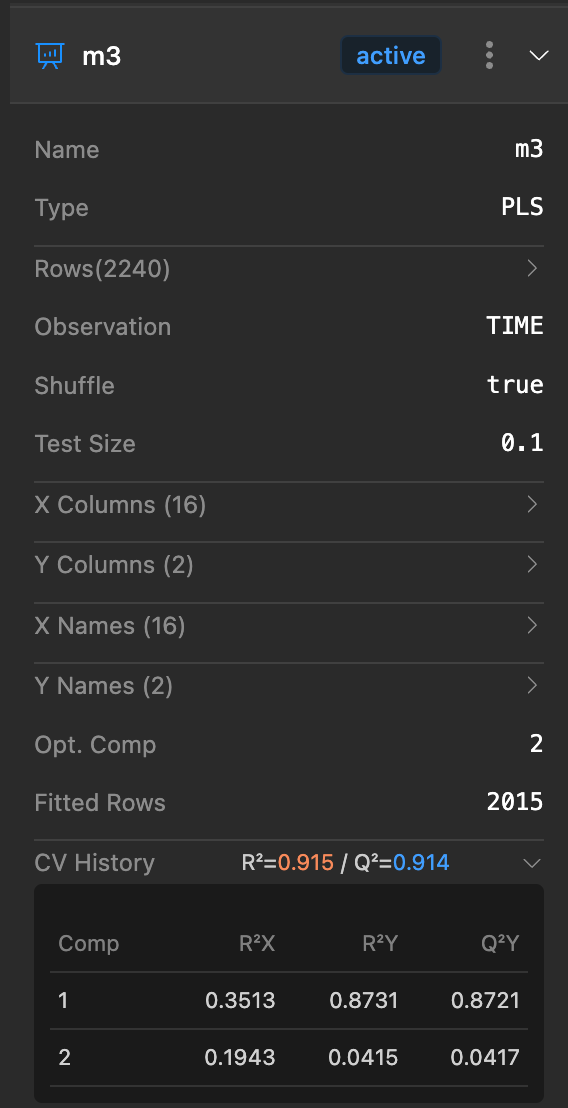
Every time the model is updated (such as after deleting abnormal data or adjusting the number of components with C+1/C-1), the system recalculates automatically. You only need to click to expand the model details to see the latest "health report":
Regression models (PLS / OPLS):
- R2X (variance explained in X): How much of the information in the X data (features) the model explains.
- R2Y (variance explained in Y): How much of the information in the Y data (results) the model explains. The higher the better — 0.9 is excellent!
- Q2Y (predictive ability): The most critical metric! It represents how accurately the model predicts unknown data. If R2Y is high but Q2Y is low, the model is "rote memorizing" (overfitting), and you need to reduce the number of components.
- RMSE (error): The lower the better; it represents the average gap between predicted values and true values.
Classification models (PLS-DA / OPLS-DA):
- Accuracy: The proportion of correct predictions.
- F1 Score: The harmonic mean of precision and recall; more reliable than accuracy when classes are imbalanced.
- AUC: Area under the ROC curve, measuring the model's overall discriminative ability (0.5 is random, 1.0 is perfect).
💡 For plain-language explanations of each metric and common misconceptions, see Key Terms Explained.
🎯 Don't Rush to Conclusions Right After Modeling
A trained model is only the starting point. Next, two things are usually done:
- Clean the data — remove abnormal samples, refit, and see whether the metrics improve → Step 3: Cleaning Data
- Explore in depth — use model exploration to work backward to the optimal process parameters → Model Exploration and Parameter Optimization
Of course, you can also just let AI diagnose for you:
- AI Cleaning —— Automatically circles abnormal samples and provides root cause analysis
- AI Chart Creation —— Automatically lays out a set of charts based on a business description
🔗 Related Reading
- Step 1: Data Preparation —— Go back one step to check the configuration
- Model Training Settings —— Adjust the behavior of the automatic search
- Core Model Algorithms Explained —— Principles and applicable scenarios of the five models