
Platform Introduction
Welcome to StarWay Data Insight (StarWayDI)! 👋
This is not boring statistical software, but an AI data exploration partner. To help you quickly understand the value of this platform, let's first clarify who can benefit from it and what core problems it can solve for you.
👨👩👧👦 Who Needs This Platform?
No matter what role you play, as long as you need to mine value from complex, multi-dimensional data, the platform can be your capable assistant. Here are the core and extended groups of users that the platform best fits:
1. Core User Groups
- 👨🔬 Industrial Process / Production Technology Engineers
- Industries: Food, chemical, pharmaceutical, materials, fermentation, agricultural product processing, etc.
- Positions: Process engineers, production supervisors, process optimization specialists.
- Uses: Use PCA to observe batch differences and quickly locate abnormal production batches; use PLS to build "process parameters → product quality" regression models; review production data offline, optimize process formulas, and precisely locate production problems.
- 🧪 Quality Inspection / Quality Control (QC/QA) Personnel
- Industries: Food, agricultural products, pharmaceuticals, fine chemicals, etc.
- Positions: Quality inspectors, quality supervisors, raw material acceptance personnel.
- Uses: Use PLS-DA for raw material grading, authenticity identification, and pass/fail judgment; use PCA to quickly discover abnormal samples and analyze batch stability; efficiently process spectral data (such as near-infrared NIR) and physical-chemical indicators offline to achieve batch sample judgment.
- 🔬 R&D / Formula Engineers
- Industries: Food formulation, feed, daily chemicals, new materials, agricultural product breeding, etc.
- Positions: R&D staff, formulators, breeding engineers.
- Uses: Use PLS to find the key influencing factors of "composition/ratio → performance"; use PCA to reduce the dimensionality of multivariate experimental data; through offline analysis of experimental data, greatly accelerate the R&D process of formulas and processes.
- 🧑🎓 Research Institutions & Testing Organizations
- Organizations: University laboratories, agricultural research institutes, analysis and testing centers, third-party testing institutions.
- Positions: Analytical chemistry researchers, laboratory technicians, data processing personnel.
- Uses: Process complex spectral, chromatographic, omics, and physical-chemical multivariate data without writing code; easily complete tasks such as clustering, classification, and regression modeling, and quickly generate data analysis charts and reports that meet the standards for research projects or paper publication.
2. Extended User Groups
- 📊 Industrial Data Analysts: Specialize in processing factory offline historical data, conducting multivariate comprehensive analysis of equipment status, product quality, and process flows (non-real-time online monitoring).
- 🔧 Equipment O&M Engineers: Analyze historical equipment operation data offline, use PCA to mine potential fault features, and effectively distinguish normal from abnormal operating conditions.
- 🌱 Agriculture / Planting Technical Personnel: For example, analyze the complex relationships between soil composition, climate conditions, planting methods, and crop quality, and use PLS models to predict yield and quality.
🎯 What Can We Do?
Imagine you have a pile of messy experimental data or production logs; there is gold hidden inside, but sand is mixed in as well.
Our task is to help you "separate the true from the false":
- Eagle Eyes: Through statistical algorithms (PCA/PLS/OPLS), you can tell at a glance which data are the "black sheep" (outliers).
- AI Brain: A built-in large language model (LLM) automatically diagnoses the business root causes of abnormal data and generates easy-to-understand cleaning suggestions and analysis reports.
- Future Prophet: Based on the cleaned, clean data, build prediction models to help you deduce future trends.
- Reverse Optimizer: Tell the model "I want this quality", and the algorithm works backward to determine "what the process parameters should be set to".
💡 In simple terms:
Imagine you are developing a new dish in the kitchen (such as baking a cake). Your recipe contains flour, sugar, temperature, and time (these are your X feature variables), and you want to pursue the most perfect taste and appearance (this is your Y target result).
Through repeated attempts:
- Non-executable area: Some recipes will burn the cake, or the dough simply won't rise (abnormal data/out-of-bounds data). The platform will help you draw these "minefields" and tell you what you absolutely must not do.
- Finding the optimal solution: Among those recipes that can bake a normal cake (executable area), the platform can help you precisely find that "most perfect ratio" among a bunch of complex parameter combinations, letting you easily reproduce the best taste!
And the key to making all of this happen efficiently lies in the platform's core highlights — it breaks down the threshold of traditional data analysis and makes complex operations simple and easy.
✨ Core Highlights
- Zero Code: No need to write a single line of Python code; drag and click to complete complex analysis.
- Visualization: Say goodbye to cold number tables; all results are presented as interactive charts — click wherever there is a problem.
- AI Empowerment: From automatic modeling to anomaly diagnosis and then to scenario planning, AI runs through the entire analysis chain.
- Explainability: In addition to VIP and regression coefficients, it also provides S-Plot marker screening, SHAP interpretability, and DML causal inference.
Now that you have grasped the platform's core advantages, let's get familiar with its operation interface — the intuitive layout design lets you get started quickly and carry out data analysis work efficiently.
🖥️ Interface Overview
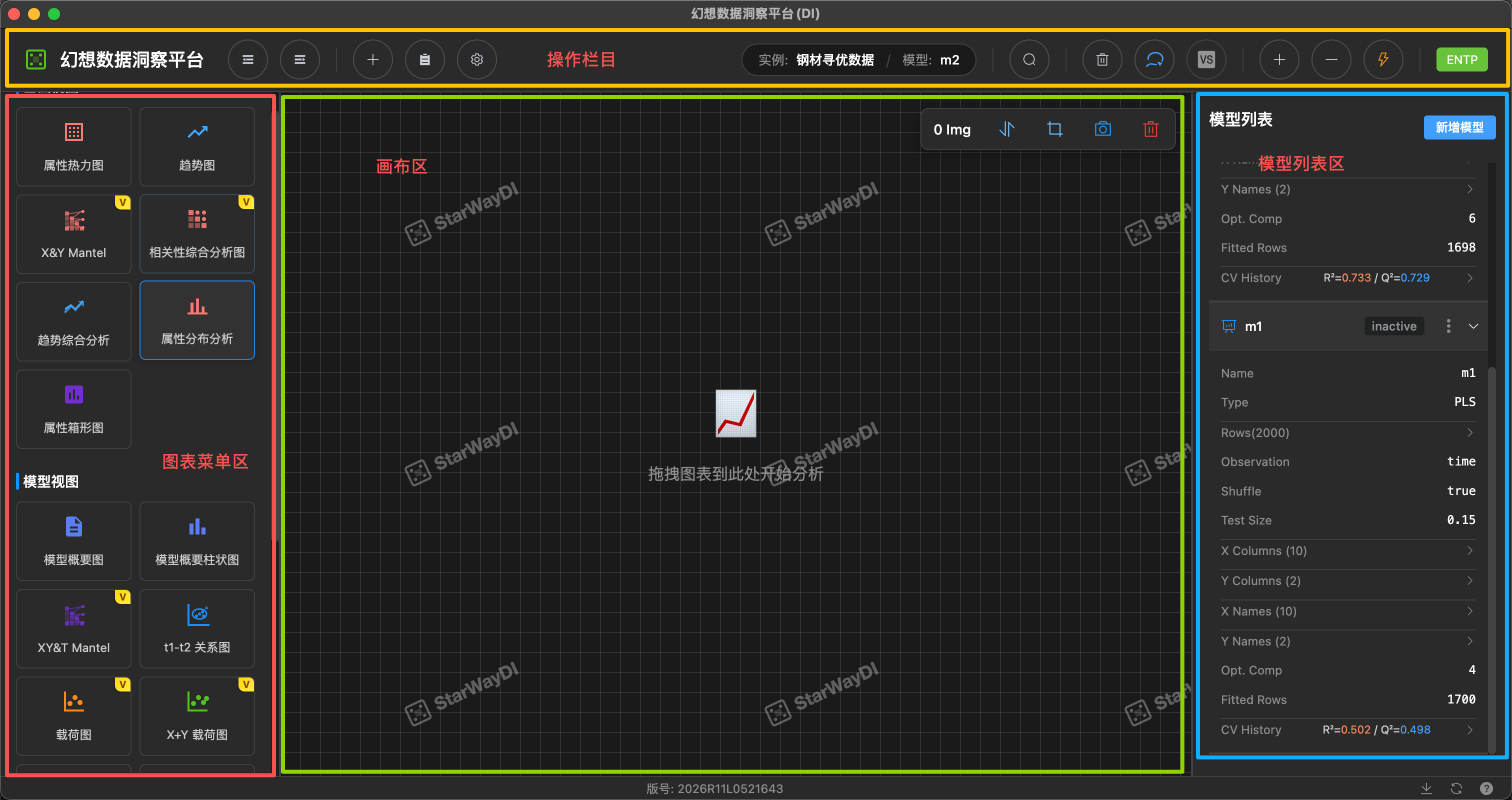
Our workbench is intuitively designed and divided into five main areas:
1. Top Bar
From left to right:
- Data & Models: Quickly switch the current business instance (such as "sales data") and the analysis model (such as "m2").
- Instance Management: Add instance, instance list, system settings.
- Analysis & Exploration Group: Model Prediction, Model Exploration, Comparative Analysis, Causal Inference (DML).
- AI Analysis Group (blue): AI Chart Creation, AI Cleaning, Existing Chart Analysis, AI Comparative Analysis, Analysis Report.
- Scenario Group (green): Scenario Analysis, Configuration Diagram Analysis, Analysis Report History.
- Cleaning Tools Group: Delete Data, Lasso.
- Model Tuning Group: C+1, C-1, Fit (refit).
💡 Menu items are automatically disabled based on the current state — for example, when no model is active, buttons such as "Model Exploration" and "AI Cleaning" cannot be clicked, and hovering the mouse shows the reason.
2. Left Chart Menu Area
This is your "arsenal", organized into two major categories, with the number of available charts shown after each title:
Basic Views (9): Data table, attribute heatmap, trend chart, trend comprehensive analysis, X&Y Mantel, correlation comprehensive analysis, attribute distribution analysis, lag influence analysis, attribute box plot.
Model Views (22): Model summary, summary bar chart, t1-t2 relationship plot, loading plot, Biplot, S-Plot, T², SPE, VIP, regression coefficients, SHAP, prediction plot…
How to use: Simply drag a chart with the mouse onto the central canvas.
Charts with a
Vbadge are VIP exclusive and require the corresponding licensed version.
3. Central Canvas Area
This is your main workbench:
- Free layout: You can freely place, scale, and align various charts.
- Multi-dimensional analysis: Supports viewing multiple charts at the same time, which makes comparative analysis convenient.
- Canvas tools: Auto Arrange, Keep Selection, Save Screenshot, Clear All.
- Lasso linkage: Points circled on any one chart are highlighted synchronously in other charts.
4. Right Model List
All of your model assets are managed here:
- Model details: View the current model type (PCA / PLS / PLS-DA / OPLS / OPLS-DA), number of samples, algorithm, scaling method, number of components, etc.
- Performance metrics: Intuitively display goodness of fit (R²), predictive ability (Q²), AUC (classification models), etc.
- Status management: Switch the activation status of the model (Active / Inactive), delete the model.
- Download: Download Online Model Package (whole-package migration) and Custom Download (export Python-usable files on demand).
5. Bottom Status Bar
- Displays the software copyright version number and system information
- Check for Updates / download progress / restart to update
- Help Documentation, Roaming Guide (interactive novice onboarding), About
🔍 Workflow
Data analysis on the StarWay Data Insight platform follows a clear, iterative process. From importing raw data to exporting the cleaned results, every step is designed to make complex statistical analysis intuitive and efficient.
It is mainly divided into four steps:
- Data Preparation: Upload Excel, set who is the feature (X) and who is the target (Y). You can also go straight through AI Build to complete it automatically.
- Modeling Analysis: Click Fit to train the model; the system automatically matches the algorithm (PCA/PLS/PLS-DA, or you can manually choose OPLS/OPLS-DA), initially establishing the variable relationships.
- Data Cleaning: This is the core! Discover outliers through charts, remove noise, retrain, and continuously improve model quality.
- Result Output: When the model metrics (R², Q², AUC, F1 score) are satisfactory, export the clean data and analysis report.
The specific workflow is as follows:
💡 Not sure where to start? Try the Roaming Guide button at the bottom — it walks you through the complete workflow in seven segments: "Instance Preparation → Modeling → Layout → Basic Charts → Advanced Exploration → Comparative Analysis → AI Features".
Are you ready? Let's start this data exploration journey! 🚀